Create a text problem
In Yandex Contest, you can create a problem with an open-ended answer. For these problems, users enter their answers as a text.
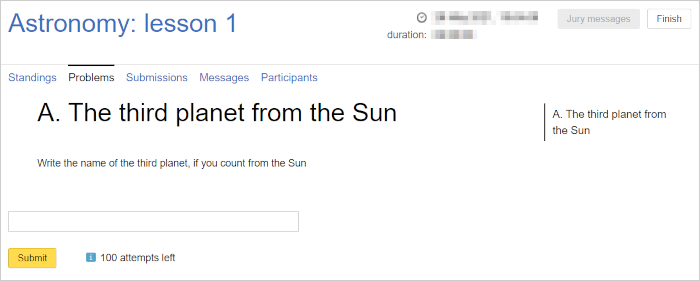
Example:
What's the name of the third planet from the Sun?
Answer: Earth
1. Create a problem
- Go to Problems and click Create problem.
- Enter a name and click Create. The name will be displayed in the participant interface.
- Enter a short name. You can also add the name in English.
- In the Problem type field, select
TEXT_ANSWER_PROBLEM.
2. Enter the correct answer
-
Select one of the following types:
- Text or file: The solution can be entered in a multi-line text input field or submitted as a file with the answer program code.
- Text: The solution must be entered in a multi-line input field.
- File: The solution must be submitted as a file.
- Single text line: The solution must be entered in one line in the input field (not applicable for some programming languages).
-
Specify the maximum answer length in characters.
-
Specify the answer pattern using regular expressions.
Pattern examples:- A word in Russian, all letters are lowercase:
html ^[а-я]{1,}$. - A word in Russian starting with a capital letter, all other letters are lowercase:
html ^[А-Я]{1}[а-я]{1,}$. - A word 1 to 5 characters long in Russian, all letters are lowercase:
html ^([а-я]){1,5}$.
Note
The
^symbol designates the beginning of the row, while the$symbol designates the end.
If you enter the same expressions without these characters, they allow any answer that contains anything matching the regular expression.For more information about regular expressions, see RegExr.
- A word in Russian, all letters are lowercase:
-
Enter the correct answer. A user's answer is counted if it fully matches the answer specified here, including the case, spaces, and hyphenation.
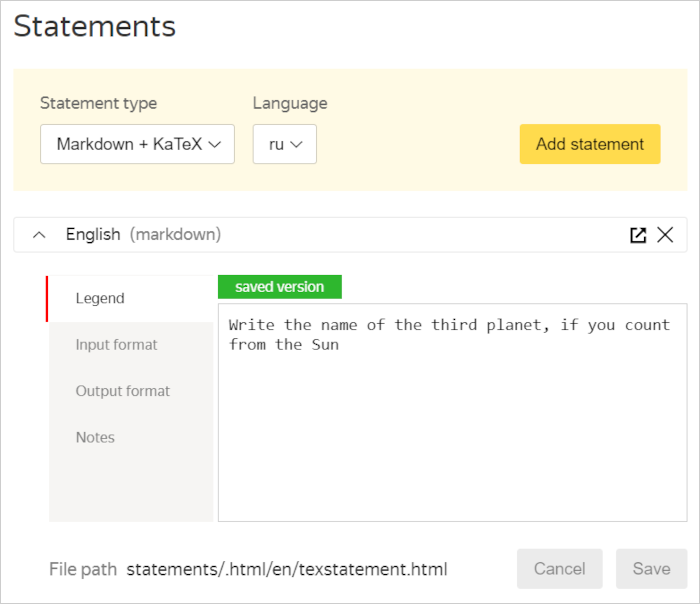
3. Add a problem statement
- Select Statements on the left.
- Select the TeX statement type.
- Select a language: ru for Russian or en for English.
- On the right, click Add statement.
- Click the row with the added statement, for example:
Russian (tex). - Enter the statement in the form and click Save.
For more information on creating problem statements, see Statements.
Note
In text problem statements, it's important to specify the format of the expected answer: starting with an uppercase or lowercase letter, in Latin or Cyrillic, in one or more words.
It's easier for the user to concentrate on finding the solution if they know exactly how they should submit the answer.